Transpose a song to another key
Transposing moves every chord in a song up or down by the same number of half steps, so you can sing or play it in a key that suits you. In Stage Friend it takes a tap on the key beside the song's title, and every chord in the song changes at once, spelled with sharps or flats to suit the new key. Musicians reach for it when the singer wants a song a tone lower, when a chart is written in a key nobody plays it in, or when a capo makes the shapes easier. It's on every plan, the free one included, and the original key is always one tap away.
Updated
Change the key
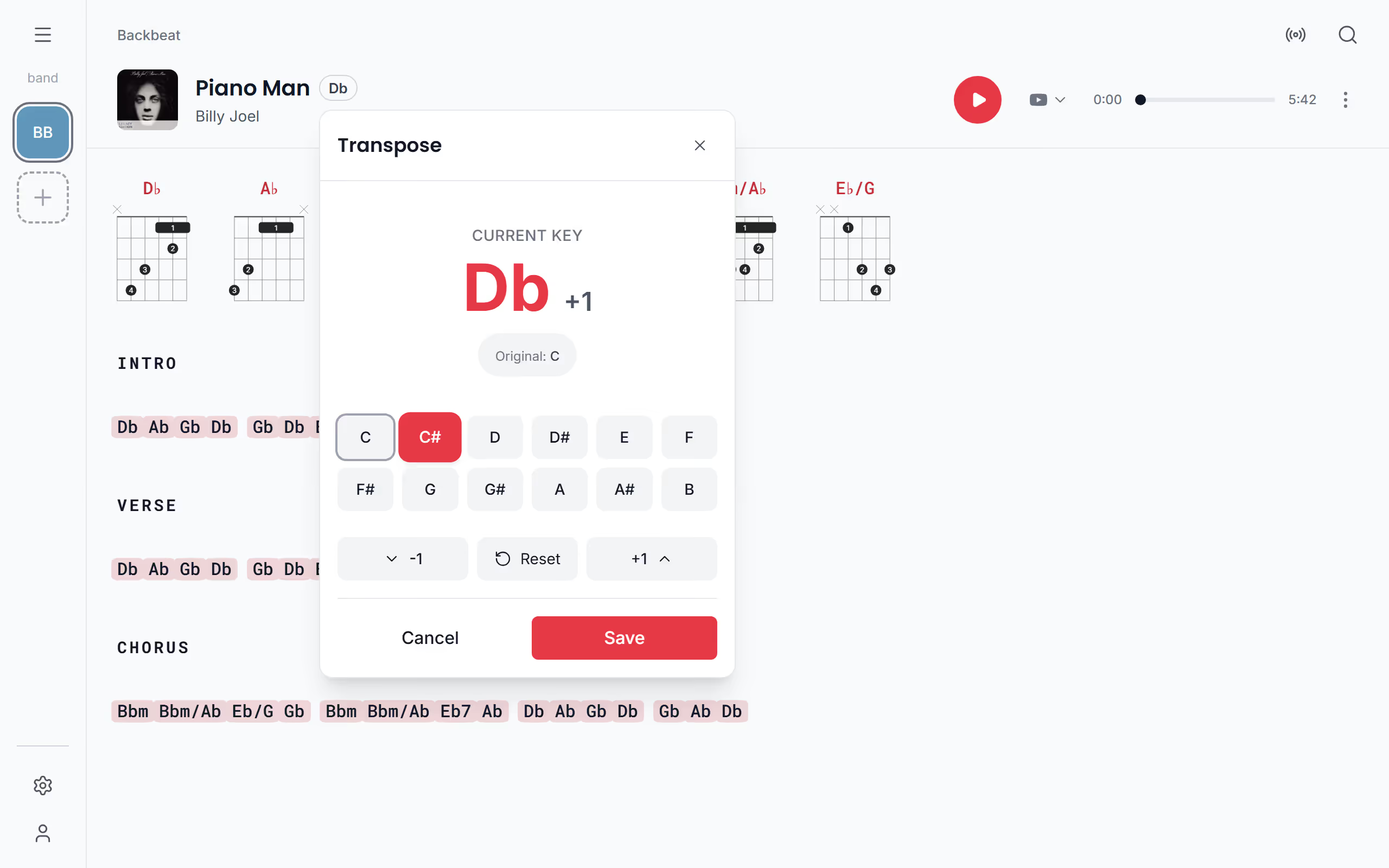
Most key changes happen at rehearsal, when the singer tries a song and it sits too high. Tap the key beside the title on the chords and lyrics page, and a panel opens with the current key shown large and all twelve keys below it. Once you've scrolled down and the title sits in the bar at the top, the key there opens the same panel. Tap a key to go straight to it, or use −1 and +1 to step a half tone at a time; the song changes behind the panel as you go, so you can read the new chords before you decide. The number beside the key shows how many half steps you've moved, Save keeps the new key, and Cancel puts the song back.
Go back to the original key
Tried a few keys and want the song back the way it was? Open the key again: once the song has moved, the panel shows the key it started in next to Original, and that key is ringed among the twelve. The round arrow between −1 and +1, called Reset on a computer, moves the song back there, and Save keeps it. If you only tried keys without saving, closing the panel puts the song back as well.
Change the key while you edit
If you're already fixing the chart in the song editor, there's no need to leave it to change the key. The key button in the editor's toolbar, Transpose, opens the same panel and moves every chord in the same way. The new key is then saved with the rest of your edits when you tap Save, and Undo takes it back like any other change.
Play with a capo
Stage Friend has no capo setting, but transposing does the same job. A capo raises the sound by a half step for every fret, so you move the chords down by the same number of half steps. To play a song that is in A with G shapes, put the capo on the second fret and transpose the song down two half steps, to G. The chords on the page are then the shapes you play, and the band hears A.
It works the same for any key: a song in E flat is awkward on guitar, but with the capo on the first fret you can play it with D shapes by moving it down one half step. Saving changes the key for everyone in the band, though, so a keyboard player would see your capo shapes too. In a band, agree on it first.
A new key is for the whole band
When you save, the chords in the song itself change, which means everyone in the band sees the new key. That's usually what you want: the singer's key becomes the band's key, and nobody turns up with an old chart. To try a key out first, close the panel without saving and the song goes back to the way it was. Once the key is settled, print a fresh chord chart for anyone who reads from paper, or check unfamiliar shapes in the chord diagrams.
Questions
- Where does the key beside the title come from?
- The key beside the title is worked out from the song's first chord, so it changes along with the chords when you transpose.
- Is there a capo setting?
- No, Stage Friend has no capo setting. Transpose the song down to the shapes you play instead, one half step for each fret the capo is on, see Play with a capo.
- Is transposing free?
- Yes, transposing is included on every plan, the free Jammer plan too.
- Does a new key change the song for my band?
- Yes, a key you save is saved in the song, so everyone in the band sees it. If you close the panel without saving, the song goes back to its key and nobody else sees what you tried.
- Do the guitar fingerings I picked survive a transpose?
- Yes, a fingering you picked is kept with the chord it was picked for. After a transpose the new chords show their standard shapes, and your choices come back if you move the song back to its original key.