The menu: where your songs, setlists and gigs are
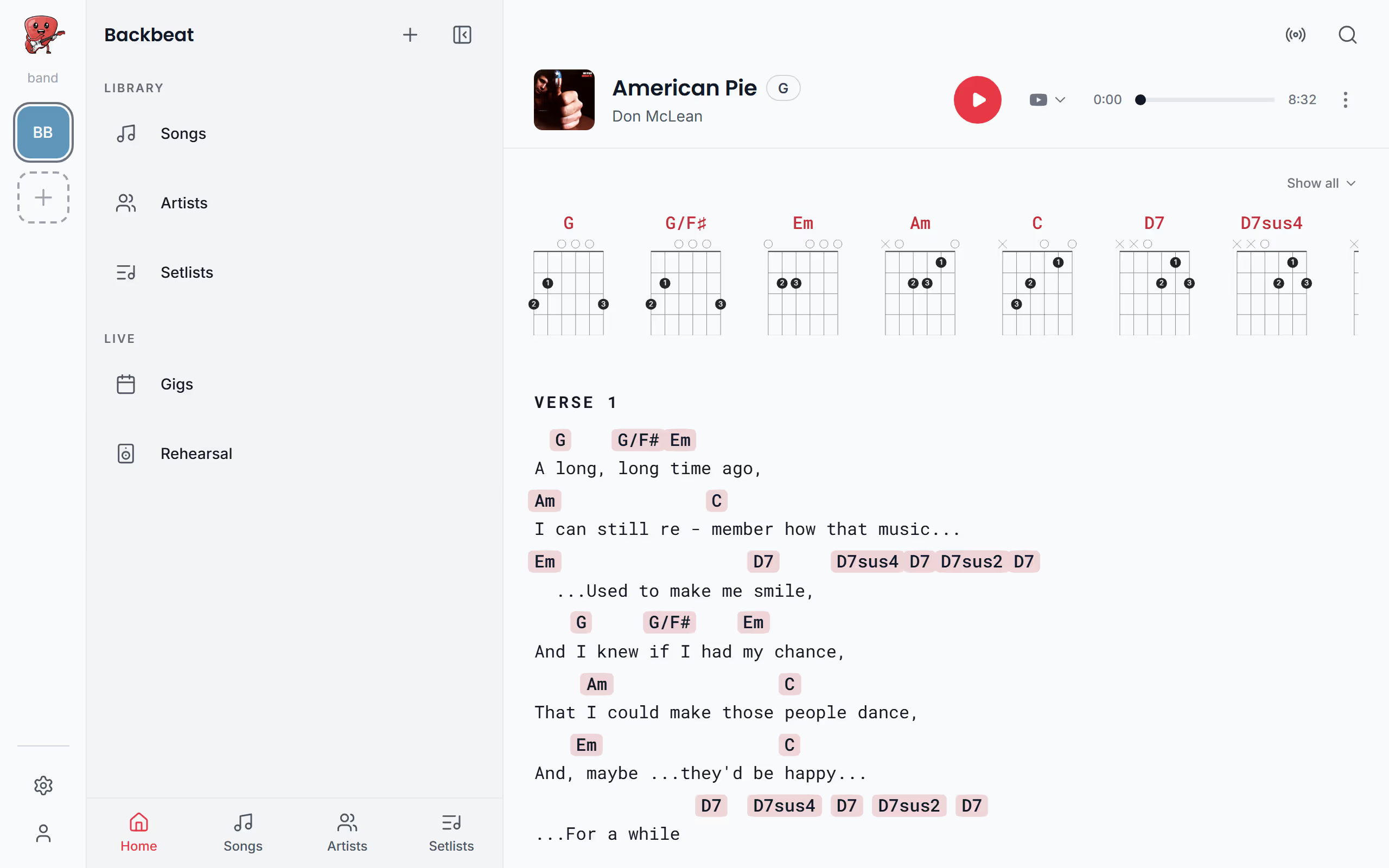
Everything in Stage Friend starts from one menu: your songs, artists and setlists under Library, your gigs and rehearsal list under Live, and the band they all belong to at the top. On a phone or tablet you open it with the menu button in the top left corner. On a computer with a mouse the menu has the same lists, and your bands and Settings sit in the narrow bar on the left of the screen.
Updated
What is where
The menu is split the way a musician's week is. Library holds your songs, the artists they're by and your setlists, which is where you spend the time at home, adding songs and putting sets together. Live holds your gigs and your rehearsal list, the things you reach for in the days before a gig and on the night. The tabs at the bottom of the menu, Home, Songs, Artists and Setlists, take you straight to the lists you use most, so you rarely need to look further. Gigs are part of Stage Pro: on the free plan Gigs opens an empty list, and its Create new gig button shows the plans. The rehearsal list comes with Solo Pro and Stage Pro, so Rehearsal only shows up there once you have one of them, see Plans.
Everything you see belongs to one band, and the band's name sits at the top of the menu. If you play in a covers band and a duo, each has its own songs, setlists and gigs, and the menu shows only the band you have open. On a phone or tablet you change band by tapping its name at the top of the menu; on a computer you tap the band's picture in the narrow bar on the left. See Switch band; the lists in the menu change with it.
Two things sit outside the lists. Search, the magnifier at the top of the screen, finds a song, a setlist or a gig without opening the menu at all, see Search. Settings is at the end of the menu's first page on a phone or tablet, under Account, and on a computer it's the gear at the bottom of the narrow bar on the left, see Settings. From here, most people start in the song library, where you open, find and add songs.
Questions
- Why can't I see the songs from my other band?
- Stage Friend shows one band at a time, so the menu and the song list show only the band you have open. On a phone or tablet, tap the band's name at the top of the menu and choose the other one; on a computer, tap the other band in the narrow bar on the left. See Switch band.
- Where are my gigs in Stage Friend?
- Your gigs are under Live in the menu, next to the rehearsal list. Creating gigs is part of Stage Pro, and on the free plan Gigs opens an empty list with a button that shows the plans, see Your gigs.