Print a chord chart or save it as a PDF
Stage Friend turns any song into a clean PDF chord chart that you can print, send to a bandmate or keep in a folder for the night the tablet battery dies. Exporting is free on every plan, and a preview of the page updates as you change the paper, the font size and what's on it. In the PDF the chords stay above their words, and the song is printed in the key it's saved in, so transpose and save first if your singer needs it lower. For a whole set on paper, see Share a setlist.
Updated
Make a PDF of a song
A paper chart is still the easiest thing to hand a dep player or clip to a music stand. In the song's three dots on the chords and lyrics page, choose Export, then pick the paper, A4 or Letter, and the Font size, and watch the preview change as you go. On a computer, or a tablet held sideways, Export is also in the three dots at the end of the song's row in your lists.
When it looks right, the button at the bottom depends on your device. On a computer it's Print, with Download PDF to save the file instead. In a browser on a phone or tablet it's Share PDF, to send it in a message or save it to your files, again with Download PDF beside it. In the Stage Friend app on an iPhone, an iPad or an Android phone there's only Share PDF, and that's also how you save the file there.
Starts on a song's chords and lyrics page. Not there yet? See Open a song.
Choose what the PDF shows
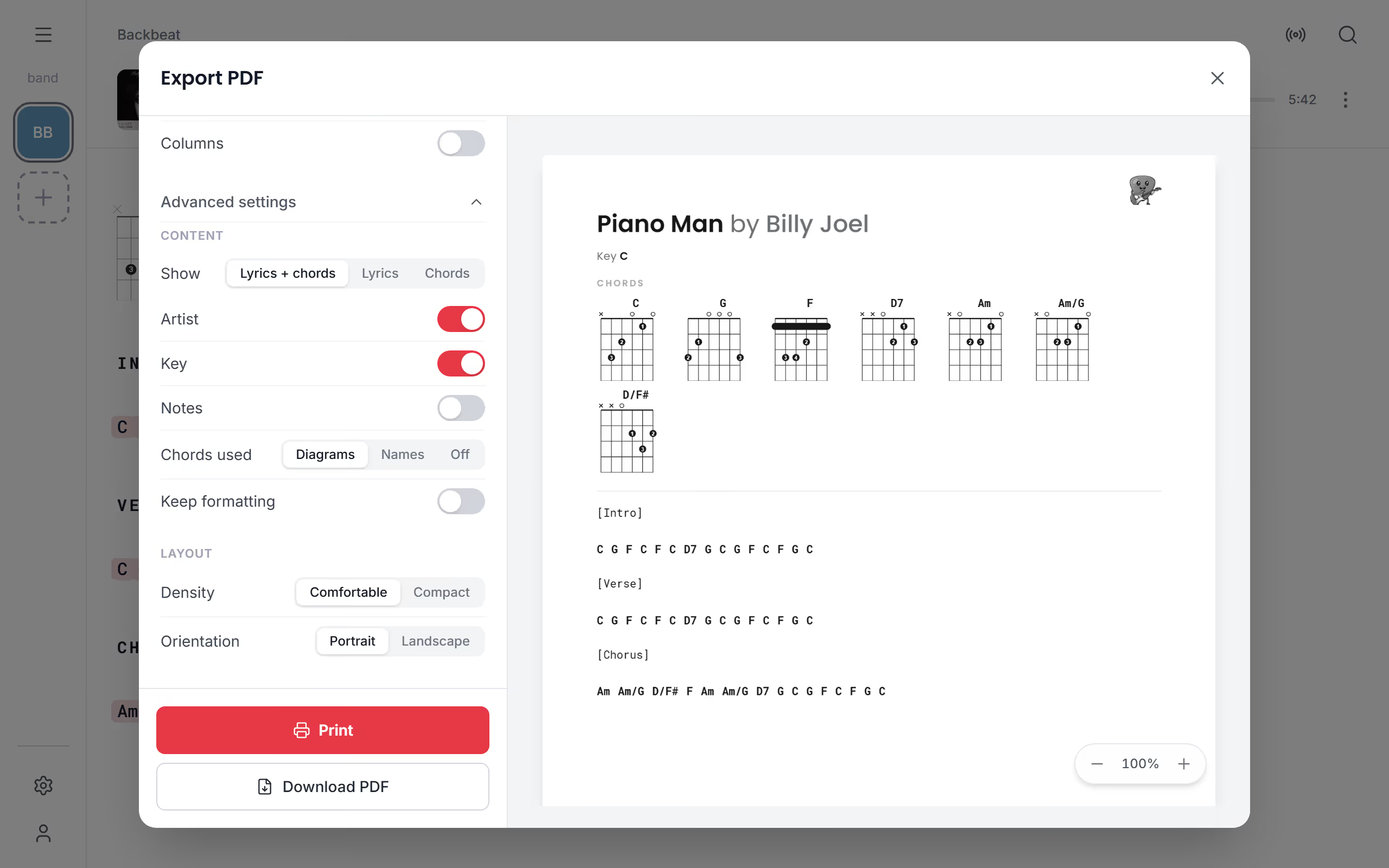
The first options cover most charts. Besides the paper and the font size, Meta info shows or hides the key and the chord diagrams at the top together, Chords leaves the chords out for a lyrics sheet, and Columns splits the page in two, so a long song takes fewer pages. The rest wait under Advanced settings: there you choose whether to print the lyrics and chords or only one of them, whether to show the artist and the key, and how Chords used appears at the top of the song, as Diagrams, as Names or Off. Diagrams are the standard, so a guitarist who doesn't know the song gets the shapes on the page.
Keep formatting keeps the bold, the colours and the highlights you gave the song; it's off to start with, so the page prints clean. Turn Notes on to print the band's notes and your own private ones at the top of the song, under its title. For the layout, choose Comfortable or Compact and Portrait or Landscape. Every page has a small Stage Friend footer. Once the chart is done, put the song in a setlist and print the whole set in one go from Share a setlist.
Questions
- Is exporting a PDF free?
- Yes, exporting a song or a setlist as a PDF is free on every plan, with all the options.
- Can I print chord diagrams with the song?
- Yes, a song's PDF shows a guitar diagram for every chord it uses at the top of the song, unless you choose Names or Off under Chords used in Advanced settings.
- Can I print a song in another key?
- Yes, the PDF uses the key the song is saved in. Transpose the song and save it, then export, and the chart is printed in the new key.
- Do the chords stay above the right words in the PDF?
- Yes, in the PDF each chord stays above the word it belongs to, also when a long line wraps or you make the text bigger.