Guitar and piano chord diagrams for each song
Stage Friend shows a guitar or piano chord diagram for every chord in a song, so you can check a shape without leaving the chords and lyrics page. Tap one chord to see how it's played, or show the diagrams for every chord in the song at once, the way a chord chart lists them at the top. There's nothing to set up: the diagrams come from the chords already in the song, and they change with them when you transpose. It's handy for the bridge chord you play twice a year, or for a bandmate learning the song on keys.
Updated
Show the chord diagrams
There are two ways to look, and the player shows both. When one chord in the middle of a verse has you stuck, tap it, or click it on a computer, and its diagram opens right next to it; a tap anywhere else closes it again. Before you play a song for the first time, the row of diagrams above the song shows every chord in it, in the order they first appear, so you can go through the shapes before the count-in.
On a phone, or a tablet held upright, the song first shows a single row of chord names, and Show diagrams opens the diagrams under them. On a computer, or a tablet held sideways, the diagrams are there in one row from the start, with Show all when there are more than fit. This row is for guitar; a keyboard player gets the piano by tapping a chord.
Switch between guitar and piano
Guitarists and keyboard players read chords differently, so a chord's diagram has both. Tap a chord, then Guitar for the shape on the fretboard, with finger numbers in the dots, or Piano for the keys of the chord lit up on a keyboard. Stage Friend remembers which one you picked, so the next chord you tap opens on the same instrument. Every chord has a piano view, while a few, like some power chords and unusual voicings, have no guitar diagram and show the piano only.
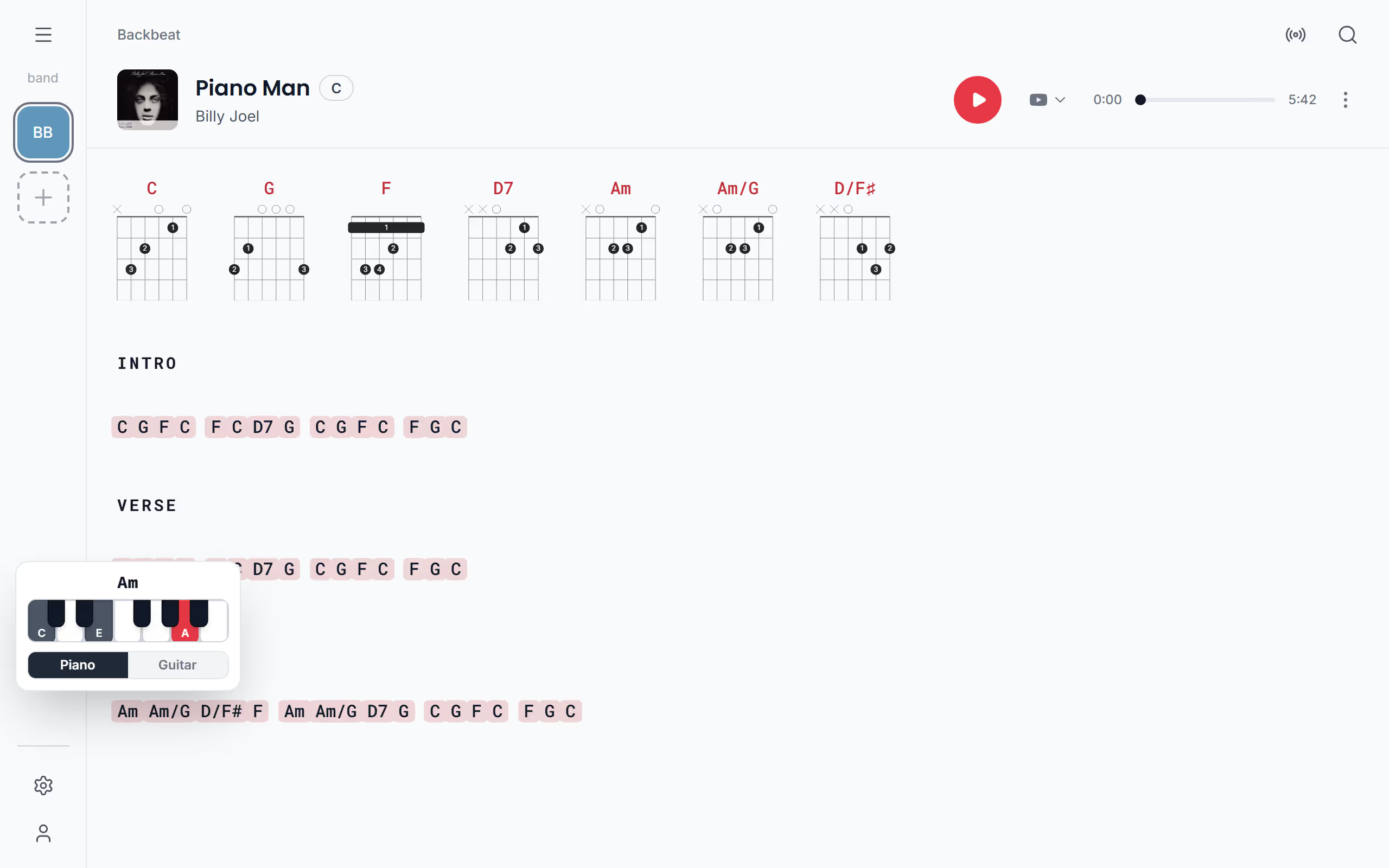
Change the fingering
The standard shape isn't always the one you play: maybe you use a barre chord higher up the neck, or the open shape rings better in this song. Under Show diagrams, tap a guitar diagram to choose another fingering from the ones listed for that chord. It applies to that chord everywhere in the song, and since it's saved with the song, the band sees it too. Reset goes back to the standard shape. You need edit rights for the song to change it.
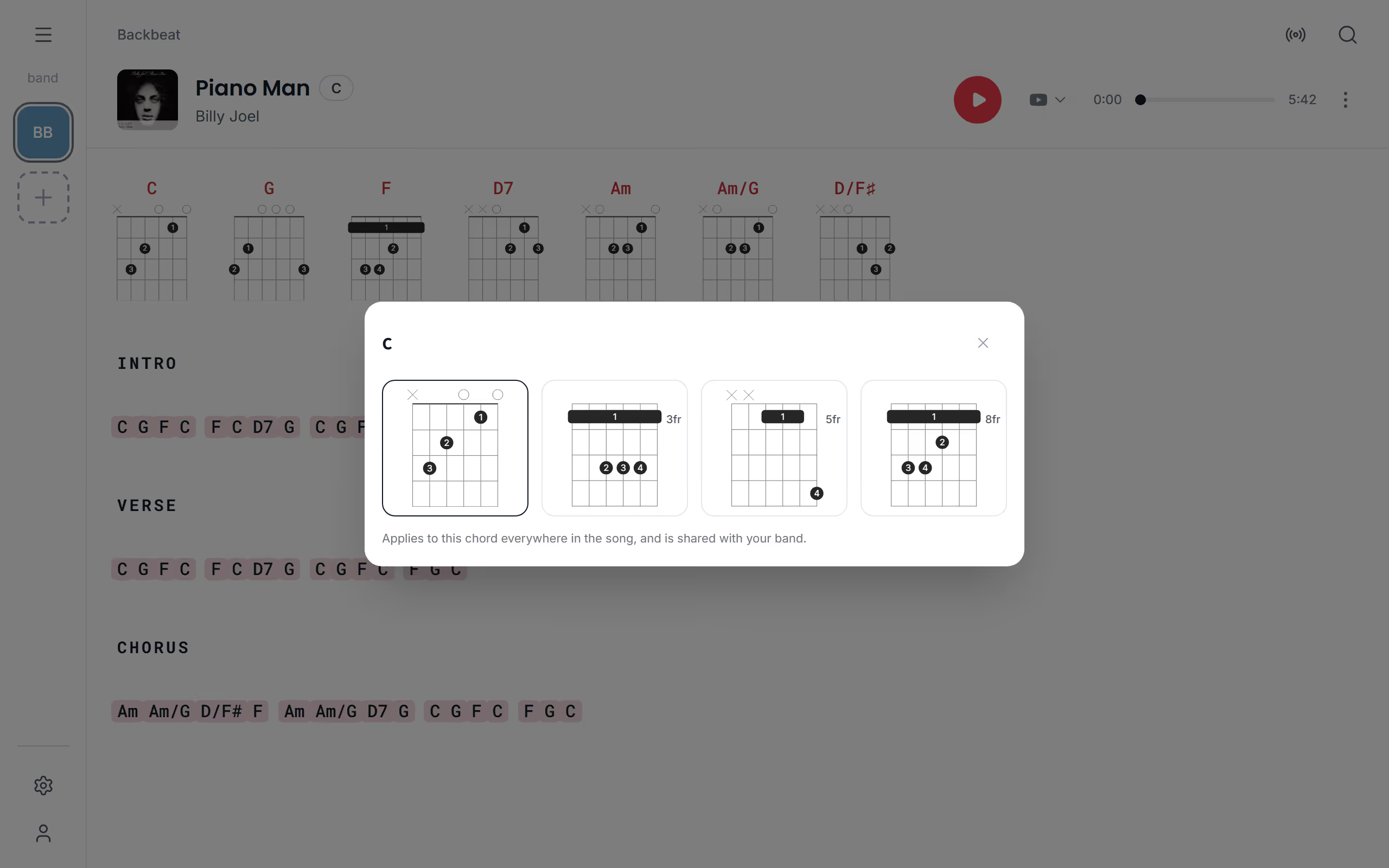
Hide the diagrams
If you know the shapes by heart, the diagrams only take up room. Turn Chord diagrams off under Show chords and diagrams to hide them for every song, or use Display in a song's three dots to hide them for that song only. Hiding the chords hides the diagrams too. With the shapes sorted, transpose the song to your key or print it with the diagrams on the page.
Questions
- Does Stage Friend show piano chords?
- Yes, every chord in a song can be shown on a piano keyboard, with the keys of the chord lit up. Tap the chord and choose Piano.
- Why does a chord have no guitar diagram?
- A few chords, such as some power chords and unusual voicings, are missing from Stage Friend's collection of guitar shapes. They show No diagram in the row of diagrams, and only the piano when you tap them.
- Do the diagrams change when I transpose?
- Yes, the diagrams always show the chords on the page, so after a transpose they show the new chords. A fingering you picked stays with the chord it was picked for and comes back if you move the song back.
- Are there ukulele chord diagrams?
- No, Stage Friend shows chord diagrams for guitar and piano only.