Play along with Spotify or YouTube
Stage Friend can play the original recording from Spotify or YouTube right on the chord sheet, so you can practise along while you read the chords. It's the quickest way to learn a new song for Saturday: the record in your ears, the chart in front of you, and no switching between apps. Playing inside the app needs Solo Pro or Stage Pro, while opening the song in Spotify or YouTube works on every plan, the free one included. What you hear depends on your device, and this page explains why.
Updated
Play the song
When you want to hear how a song goes, the play button sits by the song's title on the chords and lyrics page. Songs added from the web are linked to Spotify already, so most of your library is ready to play without any setup. On a computer you can also start a song straight from the list: rest the pointer on a song's row and a play button appears on its cover. On the free plan the play button is greyed out and shows which plan opens it, and you can still open the song in Spotify or YouTube.
Where it plays
What you hear depends on the device, because Spotify and YouTube set the rules for playing inside another app. Spotify plays a 30-second preview on phones and tablets, and the source button beside play says so with a small 30 s. On a computer, in Chrome, Edge or Firefox, it plays the whole song as long as you're logged in to Spotify in that browser, while Safari on a Mac plays the preview.
YouTube plays inside the app on computers and on Android, and can go Fullscreen when you want to watch the guitarist's hands. On an iPhone, an iPad, or in Safari on a Mac, the video opens in YouTube instead. On Android, a song that has a video plays the video, since that gives you the whole song where Spotify would give you 30 seconds.
Choose Spotify or YouTube
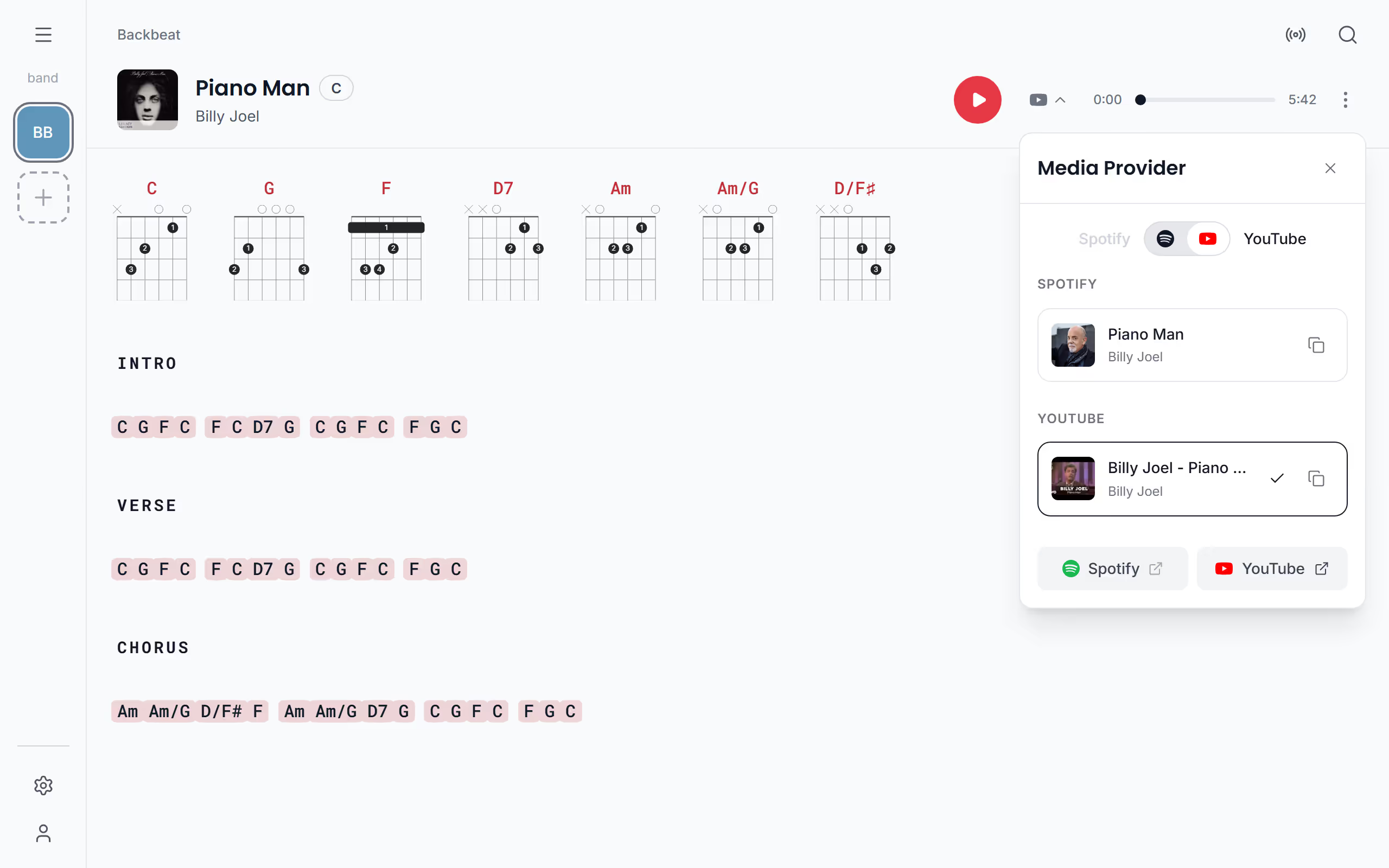
When a song has both, you can choose which one plays. The button beside play opens Media Provider, and the switch at the top chooses whether Spotify or YouTube plays. The link of each can be copied too, to send the recording to a bandmate who needs to learn it, or changed when the video found for the song is the wrong one.
Open the song in Spotify or YouTube
Sometimes you'd rather listen in the app you already use, with the whole song on any device. At the bottom of Media Provider, Spotify and YouTube open the song in their own app or site, on every device and every plan.
Keep playing while you browse
Practising a run of songs is easier when the music doesn't stop each time you look at another chart. The player stays at the bottom of the screen while you look at other songs, and a tap on the song's cover in it takes you back to that song. Open the player to choose with Autoplay what happens when the song ends: Stop after song, Continue playlist or Shuffle. Next, put your songs in a setlist, or set up autoscroll so the lyrics keep up with the music.
Questions
- Why does Spotify only play 30 seconds?
- Spotify plays the whole song in Stage Friend only on a computer, in Chrome, Edge or Firefox, when you're logged in to Spotify in that browser. Everywhere else, phones and tablets included, Spotify gives a 30-second preview, so open the song in Spotify for the whole track.
- Is playing songs included on the free plan?
- No, playing songs inside Stage Friend needs Solo Pro or Stage Pro. Opening a song in Spotify or YouTube is free on every plan.
- Why does the video open in YouTube on my iPhone?
- On an iPhone, an iPad, or in Safari on a Mac, YouTube videos open in YouTube rather than inside Stage Friend, because many videos can't be played inside other apps there. Spotify's preview still plays in the app.
- Does playing along work offline?
- No, playing from Spotify or YouTube needs an internet connection. Your chords and lyrics still open offline, see What works offline.